Showing posts with label iphone 6s. Show all posts

Friday, 18 September 2015

How to upgrade your iPhone / iPad / iPod to iOS 9


iOS 9 is out. If you want to upgrade your device to this new iOS from Apple, follow our step by step Guide :

For OTA Update


1. First, make sure your device is compatible. Here is the full list of supported Apple device

iPhone: iPhone 6S Plus, iPhone 6S, iPhone 6 Plus, iPhone 6, iPhone 5S, iPhone 5C, iPhone 5, iPhone 4S.

iPad: iPad Pro, iPad Air 2, iPad Air 1, iPad Mini 4, iPad Mini 3, iPad Mini, iPad 3, iPad 2

iPod Touch: iPod Touch 6, iPod Touch 5.


2. Backup your device to iCloud your mac or iCloud.

3. Go to Settings -> General -> Software Update and tap "Download and Install"


4. Wait until the installation finished.


For Update with iTunes 

1. First, make sure your device is compatible. Here is the full list of supported Apple device

iPhone: iPhone 6S Plus, iPhone 6S, iPhone 6 Plus, iPhone 6, iPhone 5S, iPhone 5C, iPhone 5, iPhone 4S.

iPad: iPad Pro, iPad Air 2, iPad Air 1, iPad Mini 4, iPad Mini 3, iPad Mini, iPad 3, iPad 2

iPod Touch: iPod Touch 6, iPod Touch 5.

2. Update your iTunes to the latest version. The minimum version of your iTunes must be 12.3.

3. Next, connect your device to iTunes. there will be update notification.

4. Click Download and Update


5. Wait until the update finished. 
Thursday, 10 September 2015

4 Ways to improve your iphone speed


1. Reboot / Restart
One of the most effective way to improve your iphone speed is to reboot your iphone once in a while. Do this when you have time or when you not doing your activity with your iphone. 

2. Clear Cache 
In iOS, Safari is one of the most effective app that apple ever created for their iphone product. It also effective in cleaning unused data inside your iphone. However, Clean this cache data manually can also improve your iphone speed. Here is how to do it : 

- Open Settings app
- Tap on Safari
- Scroll down until you find Advanced option
- Tap on Website data and choose Remove all website data

3. Delete apps that you don't use anymore
Other thing which you can do to speed up your iphone is delete apps that you not use anymore. This can free more space from your iphone. To do this just tap and hold the apps you want to delete. Tap cross button to delete the apps

4. Turn off unused feature
Turn off some feature can dramatically improve your iphone. However, you can choose which feature from apps that you want to disabled. This is often come from apps through Background App Refresh. To turn this off, follow the steps below : 

- Open Settings app
- Tap background app refresh
- choose which app you want to disable.

Friday, 4 September 2015

5 Hidden iPhone 6 and 6s tricks

1. Reachability feature

Reachability feature help you to reach top of their iphone screen with their thumb while holding your iphone single-handedly. Just double touch your home button to make your screen slide half down near your thumb.


2. Smooth Video Recording

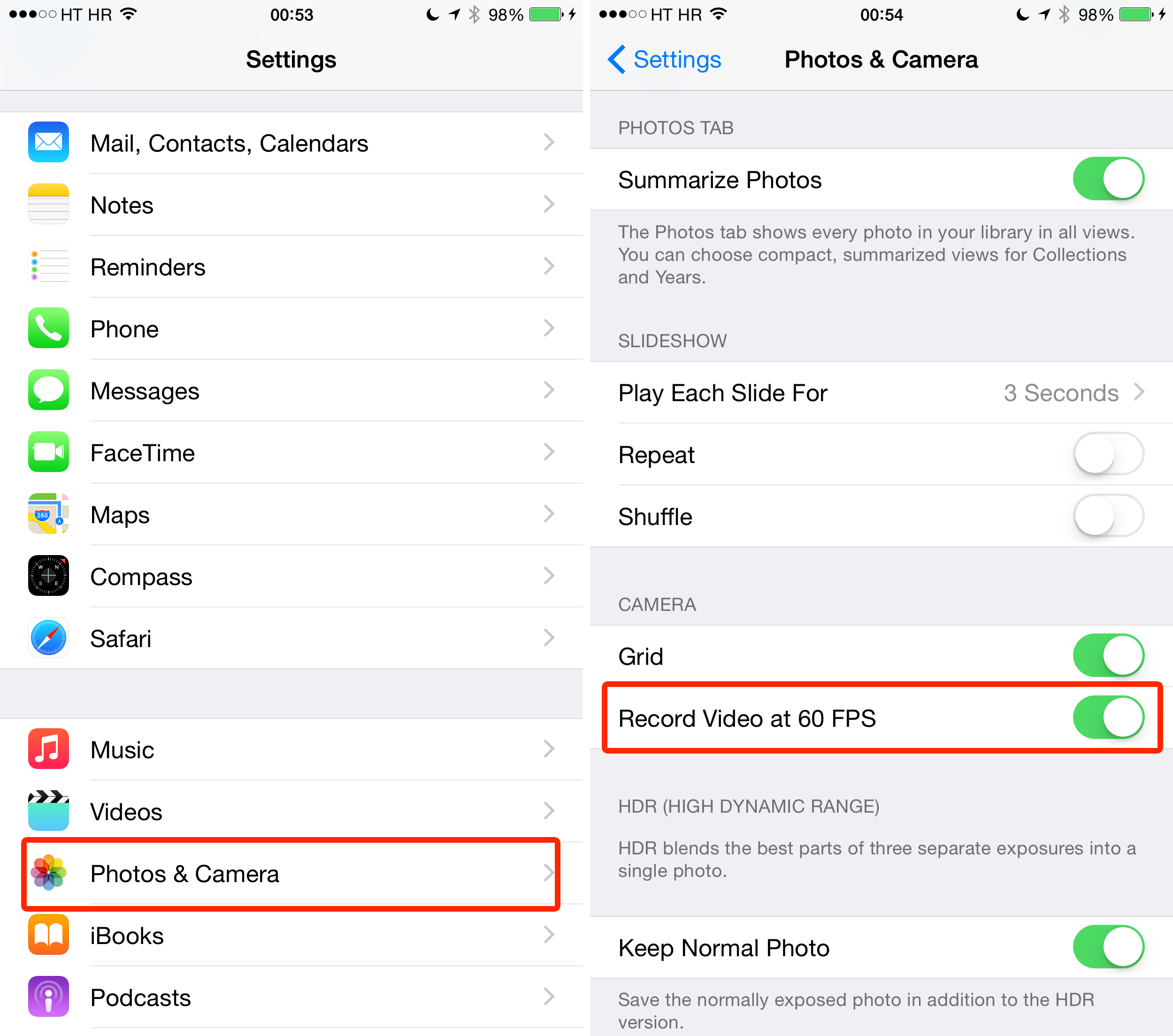
With your iPhone 6s and 6, you can record smoother video by enabling 60 fps (frame per second) capability. To do this, just go to Settings - Photos & Camera - Record video at 60 fps.


3. How to record slow motion video

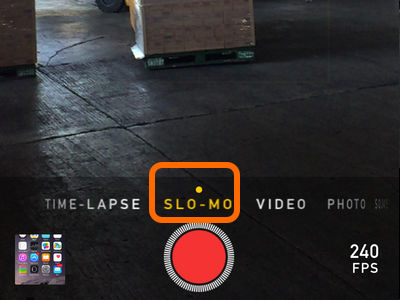
Start with iPhone 6, you can now capture slow motion video using your iphone. To Enable this, open your camera app and choose SLO-MO from horizontal sliding menu at the bottom of your screen.


4. Capture photo using volume keys

You can capture photos using volume keys. Just open your camera app and press the volume key to snap a photo. Great for candid photo !


5. How to define a word 

When you using safari to read an article or reading email using mail apps, you can look for word definition. In order to do this, select the word by pressing and hold the word, an option will appear, choose define to search for it's meaning in dictionary.